Showing posts with label custom rom for mt6582. Show all posts

Nova UI Rom for MT6582

About Nova Rom: It is a nice rom for lollipop device with mtk6582 mediatek chipset.  
Rom Info:
Rom Name: Nova UI
Chipset: MT6582
Android Version: 5.0.2 Lollipop

Nova UI has Nice Icons and Status bar with some cool features in black interface. This rom good for use. Good ram manage and better performance. It has one bug in Hotspot. 

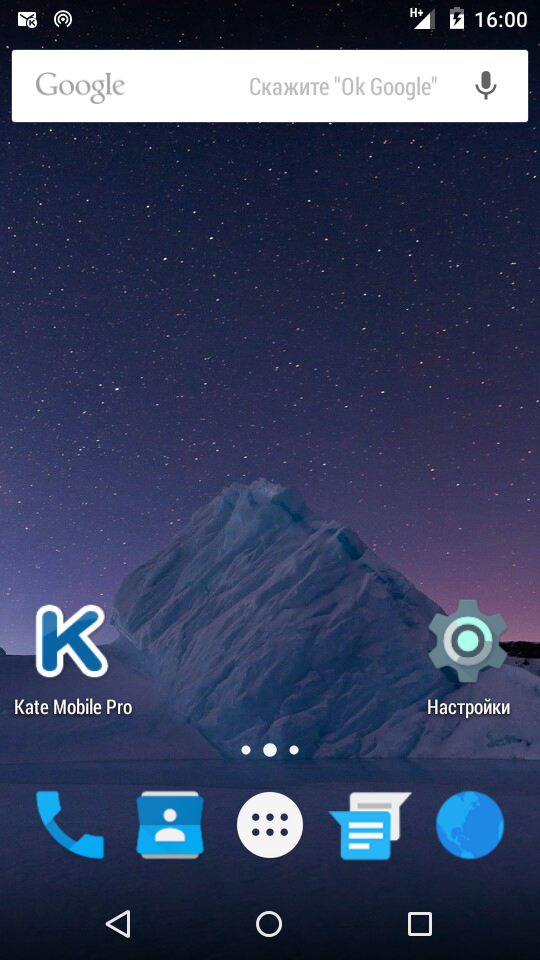
Screenshot: Screenshots of status bar, Home, Dial pad, Notification and settings menu.


Always take backup your current rom before flash
Need to port for your device before flash


Flash process:
Reboot to Recovery Mode >

Wipe data/factory reset

Wipe cache partition

               1. Format data
               2. Format system
               3. Format cache
               4. Wipe dalvik cache


Select

Install zip from sdcard > Choose zip from sdcard
Select Rom zip file.


N.B. : All the Things do at your won Risk. I will not be responsible for any kind of Brick/Damage of your phone.


Galaxy Note 5 Custom Rom for MT6582


Note 5 Rom for MTK6582

Rom Info:
Rom Name: Note 5
Chipset: MT6582
Android Version: Lollipop


Galaxy Note5 Features


Always take backup your current rom before flash
Need to port for your device before flash


Flash process:
Reboot to Recovery Mode >

Wipe data/factory reset

Wipe cache partition

               1. Format data
               2. Format system
               3. Format cache
               4. Wipe dalvik cache


Select

Install zip from sdcard > Choose zip from sdcard
Select Rom zip file.


N.B. : All the Things do at your won Risk. I will not be responsible for any kind of Brick/Damage of your phone.


[AICP 11] AICP Custom Rom for MTK6582

Android Ice Cold Project Rom for MT6582
AICP v11 for MT6582


Rom Info:
Rom Name: AICP
Rom Version: 11
Chipset: MT6582
Android Version: 6.0.1
AICP New Version Rom


Features:
Based on CyanogenMod
CyanogenMod Features
System UI Tuner
Setting Notification Panel
Full Tinted 
Fixed Camera
Flashlight Fixed
Many More..


Screenshot:


Download AICP Rom


Credit:
SRT
MTKcROM


Always take backup your current rom before flash

Need to port for your device before flash


Flash process:

Reboot to Recovery Mode >

A.Wipe data/factory reset

B.Wipe cache partition
C. Mount and storage >
               1. Format data
               2. Format system
               3. Format cache
D. Advanced >
               1. Wipe dalvik cache

Back to the Main Menu.


Select

Install zip from sdcard > Choose zip from sdcard
Select Rom zip file.


N.B. : All the Things do at your won Risk. I will not be responsible for any kind of Brick/Damage of your phone.


[Kit-Cat v1.1] Kitkat Rom for MT6582

Kit-Cat Rom for MTK6582
Android 4.4.2 Roms for MT6582 


Rom Info:
Rom Name: Kit-Cat
Version: 1.1
Chipset: MT6582
Android Version: 4.4.2 [Kitkat]
Kernel: 3.4.67
Build from Source


Do Not Copy Content/Rom from Here

Features:
New Framework
Deodexed Rom
New Graphics from AOSP
Name of WI-FI signal and network
Full worked adb
Display of the network signal changed
Disable notification in absence of the second SIM
Remove almost all the color from the sim MTK
Sewn PPM
Fix minimum volume and sound quality
Default arrangement and the main application screen changed
Hidden set of tiles placement in AOSP
Time zone updated
Fix RIL operation
Unlocking voice 
Unlocking the face
The schedule on/off
Proper mounting of internal storage and SD
Free more RAM
Stable and Bugless Rom


Screenshot:


Download KitCat Rom


Credit:
FMD 


Always take backup your current rom before flash

Need to port for your device before flash


Flash process:

Reboot to Recovery Mode >

A.Wipe data/factory reset

B.Wipe cache partition
C. Mount and storage >
               1. Format data
               2. Format system
               3. Format cache
D. Advanced >
               1. Wipe dalvik cache

Back to the Main Menu.


Select

Install zip from sdcard > Choose zip from sdcard
Select Rom zip file.


N.B. : All the Things do at your won Risk. I will not be responsible for any kind of Brick/Damage of your phone.


[Custom Rom] BlissPop 4.0.3 Rom for MT6582

BlissPop v4.0.3 Rom for MTK6582
CyanogenMod for MTK6582


Rom Info:
Rom Name: BlossPop
Rom version: 4.0.3 [Unofficial]
Chipset: MT6582
Android Version: 5.1.x
Based on: CyanogenMod


Features:
Personalization Features
Recents Features
Quick Settings Features
Animations Features
App Circle Bar Features
AudioFX Equalizer 
Device Options Features
Sound & Notification Features
Developers Options


Screenshot:


Credits
Google and AOSP
Team Bliss
CyanogenRom
SlimRoms
cordell
temasek
ZION959
Rohan Taneja


Always take backup your current rom before flash

Need to port for your device before flash


Flash process:


Required Recovery: PhilZ Recovery 6.59.x

Reboot to Recovery Mode >

A.Wipe data/factory reset

               1. Format data
               2. Format system
               3. Format cache

Select
Install zip from sdcard > Choose zip from sdcard
Select Rom zip file.


N.B. : All the Things do at your won Risk. I will not be responsible for any kind of Brick/Damage of your phone.


[Mystic OS V7] Mystic OS 7 for MT6582

Mystic OS New Version 7 for MTK6582 Devices


Rom Info:

Rom Name: Mystic OS

Version: 7
Chipset: MTK6582
Android: 4.4.2 Kitkat

Features:


CyanogenMod CM12.1 Themed
Full Lollipop Framework
Lollipop Material Design
CyanogenMod 12.1 Application Icons
Nova Prime as Default Launcher
Android M Sounds
Marshmallow Boot Animation
Mystic OS Bootlogo
Platlogo Marshmallow
CM12.1 Music Player
Lollipop Inspired Volume Panel
Stock Gallery
Stock Camera
Lollipop Lockscreen
Pre Rooted with Super User
Busybox Installed
Added ABS Tweak
Smart Gestures
Gesture Anywhere
Font chooser
Lcd density change option
Multi User options
Build prop editor
Ad Blocker
Listview and Toast animations
Custom progress bar
And Many More....


Screenshot:


Download Mystic OS v7


Credit and Thanks:
Raj Shekhar and View More


Always take backup your current rom before flash

Need to port for your device before flash


Flash process:
Reboot to Recovery Mode >

A.Wipe data/factory reset
B.Wipe cache partition
C. Mount and storage >
               1. Format data
               2. Format system
               3. Format cache
D. Advanced >
               1. Wipe dalvik cache

Back to the Main Menu.

Select
Install zip from sdcard > Choose zip from sdcard
Select Rom zip file.


N.B. : All the Things do at your won Risk. I will not be responsible for any kind of Brick/Damage of your phone.

[Lollifox Rom] 1.6 Version for MTK6582

Custom Rom for MT6582 
Lollifox Updated New Version Rom 


Changelogs:

A mobile network code Yota added
More like Lollipop Settings
Proper display of the communication module firmware
Separators removed in contact
Changed the button "New message" in messages
Color Fixed of inactive items
A tile in the shutter Flashlight added
And Many small fixes
And Many More Features....


Screenshot:


Download Lollifox:


Always take backup your current rom before flash
Need to port for your device before flash


Flash process:
Reboot to Recovery Mode >

A.Wipe data/factory reset
B.Wipe cache partition
C. Mount and storage >
               1. Format data
               2. Format system
               3. Format cache
D. Advanced >
               1. Wipe dalvik cache

Back to the Main Menu.

Select
Install zip from sdcard > Choose zip from sdcard
Select Rom zip file.

Credit:
FMD Team


N.B. : All the Things do at your won Risk. I will not be responsible for any kind of Brick/Damage of your phone.


Top